
The Salesforce Certified Tableau Architect exam, Analytics-Arch-201, asks one question over and over: can you run Tableau as a platform? Sign-in methods, node roles, migrations between environments and the monitoring that keeps a deployment healthy fill the paper, so a strong workbook author with no server experience can sit it and recognise almost nothing.
What the Tableau architect exam covers instead is the platform underneath the workbooks. Its objective list names eight authentication methods to configure and troubleshoot, seven separate migrations to plan, a set of external services to stand up, and a load testing routine to run. It is 59 questions in 105 minutes at a 63 percent pass mark, and 78 percent of it sits in deploying, monitoring and maintaining a Tableau deployment rather than designing one.
Table of Contents
- Architect, administrator or consultant: which Tableau exam is this?
- What are the Analytics-Arch-201 exam facts?
- How are the three domains weighted?
- What does the 22 percent design domain ask you to plan?
- Which eight authentication methods must you configure?
- Why is monitoring and maintenance worth 41 percent?
- What does Salesforce expect before you book?
- How should you prepare for the Tableau architect exam?
- Frequently Asked Questions
- Conclusion
Architect, administrator or consultant: which Tableau exam is this?
Analytics-Arch-201 is the Tableau exam for people who build and scale the platform itself. Salesforce aims it at technical architects who lead the design of a Tableau Server deployment or a Tableau Cloud migration. The consultant exam covers advising on analytics content, and the server administrator exam covers running an existing site.
The three are easy to confuse because their titles all suggest seniority. The practical test is what your working week looks like. If you spend it deciding node roles, wiring identity providers, sizing backgrounder processes and planning how a deployment moves from one environment to another, the architect exam describes you. If you spend it recommending dashboards, calculations and governance to business teams, the consultant route fits better.
The administrator credential sits closer to the architect one, and that is where the real decision lies. Day to day administration of users, schedules and sites is assumed knowledge here rather than the thing being tested. The architect paper asks what you would build, how you would move it, and how you would prove it is healthy once it is running.
- Choose the architect exam if you design multi node Tableau Server deployments or lead Tableau Cloud migrations
- Choose the administrator exam if you run a Tableau Server or Tableau Cloud site that somebody else designed
- Choose the consultant exam if your deliverable is analytics content and recommendations for business users
What are the Analytics-Arch-201 exam facts?
Analytics-Arch-201 has 59 questions in 105 minutes and a 63 percent passing score. Registration costs 400 US dollars and a retake costs 200. Of the 59 questions, 54 are scored multiple choice and up to five are unscored, and the exam tests Tableau product version 2024.2.
| Field | Value |
|---|---|
| Credential | Salesforce Certified Tableau Architect |
| Exam code | Analytics-Arch-201 |
| Questions | 59 (54 scored, up to 5 unscored) |
| Duration | 105 minutes |
| Passing score | 63 percent |
| Registration fee | 400 USD plus applicable taxes |
| Retake fee | 200 USD plus applicable taxes |
| Delivery | Proctored, at a test centre or online, registered through Pearson VUE |
| Prerequisites | None |
| Reference materials | None permitted during the exam |
| Product version | Tableau 2024.2 |
| Maintenance | Annual maintenance module on Trailhead |
The unscored questions matter more than they look. You cannot tell which five they are, so every question has to be treated as live, and the pass mark applies to the 54 that count. In practice that means pacing for all 59 inside the 105 minutes, which leaves a little under two minutes a question.
The product version is the second detail worth noting. Salesforce’s official exam guide states that the exam currently tests release 2024.2, so features added to Tableau Server and Tableau Cloud after that release are not what the questions are written against.
How are the three domains weighted?
The Analytics-Arch-201 exam has three domains. Design a Tableau Infrastructure is 22 percent, Deploy Tableau Server is 37 percent, and Monitor and Maintain a Tableau Deployment is 41 percent. Deployment and ongoing operation together account for 78 percent of the exam, so design is the smallest domain despite the architect title.
| Domain | Weight | Objective groups | Headline content |
|---|---|---|---|
| Design a Tableau Infrastructure | 22% | 5 | Requirements, Tableau Cloud, migrations, topology, configuration |
| Deploy Tableau Server | 37% | 5 | Production deployments, authentication, encryption, Linux and Windows installs |
| Monitor and Maintain a Tableau Deployment | 41% | 6 | Admin views, load testing, performance, observability, automation, extensions |
Salesforce weights by domain, not by objective group, so the table tells you where effort belongs rather than how many questions any single topic will produce. The money site and Salesforce publish the same three domains, the same weightings and the same sixteen objective groups, and the full Arch-201 syllabus lists every named task under each group.
Reading that list end to end is the fastest way to see what kind of exam this is. The verbs are configure, troubleshoot, install, implement, interpret and automate. Recommend appears too, but it is attached to concrete things: configuration keys, hardware specifications, a disaster recovery strategy, a load testing strategy.
What does the 22 percent design domain ask you to plan?
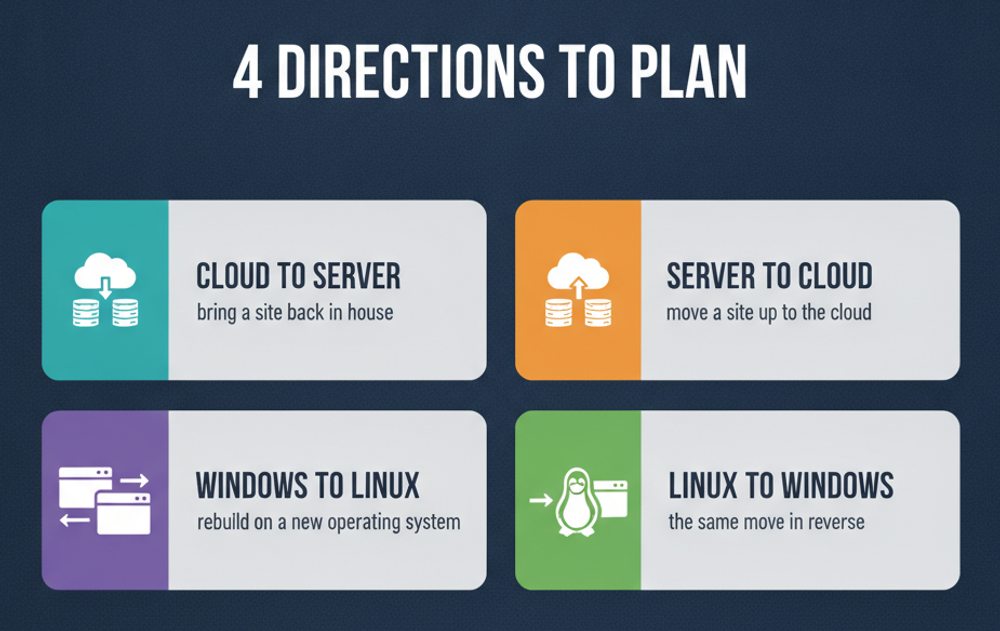
The design domain in the Tableau architect exam covers five areas: gathering requirements for a complex deployment, planning and implementing Tableau Cloud, planning migrations, designing a process topology, and recommending a Tableau Server configuration. Migration planning alone names seven separate scenarios, which makes it the most specific part of the domain.
Requirements and Tableau Cloud
Requirements gathering here is infrastructure requirements, not business ones. You assess user counts and role distribution, constraints and future growth, the need for high availability and disaster recovery, and the licensing strategy, including Authorization-to-Run. You also map the Tableau Server add-ons to what the organisation actually needs.
The Tableau Cloud objective adds Tableau Bridge, authentication, multi-site management through Tableau Cloud Manager, and automated user provisioning. Provisioning is named with its standard, System for Cross-domain Identity Management, whose SCIM protocol specification is published by the IETF. Knowing what SCIM does and does not synchronise is the difference between a working provisioning design and a support queue.
The seven migrations
- Tableau Cloud to Tableau Server
- Tableau Server to Tableau Cloud
- Windows to Linux
- Linux to Windows
- One identity store to another
- Several Tableau servers or sites consolidated into fewer
- One Tableau Server environment to another
The objective adds two tools to that list: writing scripts for migration, and using the Tableau Content Migration Tool. Tableau’s own Content Migration Tool documentation carries a detail worth knowing: the tool is part of Tableau Advanced Management, and Tableau does not recommend it for moving from Tableau Server to Tableau Cloud, pointing instead to the Tableau Migration SDK. Choosing the right tool for the direction of travel is exactly the kind of judgement this objective tests.
Topology and configuration
The last two objective groups are where sizing happens. You specify process counts, node count and node roles, including when to isolate a service and when to colocate it, and when to move a component to an external service. Configuration recommendations cover the identity store, specific configuration keys, encryption at rest and over the wire, hardware and network specifications, and a disaster recovery strategy.
Which eight authentication methods must you configure?
The Tableau architect exam names eight authentication methods to configure and troubleshoot: SAML, Kerberos, OpenID Connect, Mutual SSL, trusted authentication, Connected App authentication, LDAP, and Azure Active Directory. They sit inside Deploy Tableau Server, the 37 percent domain, which also covers production deployments, encryption, and installation on both Linux and Windows.
Authentication is a troubleshooting objective
Every method in that list carries the same pair of verbs: configure and troubleshoot. Knowing that Tableau supports SAML is not enough; the exam expects you to know why a SAML sign-in fails and where to look. It helps to understand the protocol itself, and the OASIS SAML standard is the specification of record for the assertions an identity provider sends.
The objective closes with dependencies between authentication methods and Tableau environments, including Tableau Cloud. Not every method is available everywhere, and some cannot be combined, so a question may describe an environment and ask which method will actually work in it.
Production deployments and encryption
The production deployment objective is a long list of named components. You are expected to configure an external file store, an external repository, an external gateway, an unlicensed node, a coordination ensemble, a backgrounder with a specific node role, and a load balancer. Beyond configuration, it names installing in an air-gapped environment, performing a blue-green deployment, validating a disaster recovery and high availability test, reading installation logs, running the Resource Monitoring Tool, and automating installation with the Silent Installer.
Encryption is its own objective group: SSL, database encryption, extract encryption, and setting up service principal names for Kerberos. Tableau’s guide to distributed and high availability installations is the reference for how these pieces fit together, and it is candid that Tableau Cloud will suit most organisations better than self-hosting, which is why Cloud migration keeps appearing in an exam about servers.
Linux and Windows, both
Installation is tested twice, once per operating system, with near-identical objectives: install by command line or wizard, resolve installation, network, external system and proxy issues, find the right logs, and verify system groups and file permissions. Windows adds the Run As service account. If your experience is on one platform only, the other is an obvious gap to close.
Why is monitoring and maintenance worth 41 percent?
Monitor and Maintain a Tableau Deployment is the largest Analytics-Arch-201 domain at 41 percent because it covers six objective groups: custom administrative views, load testing, performance bottlenecks, observability data, automation of server maintenance, and server extensions. It tests whether you can keep a deployment healthy and prove it with evidence, not just build it.
Evidence first: admin views, load tests and observability
Custom administrative views start from the repository schema and its event types, and extend to building admin dashboards and using Admin Insights on Tableau Cloud. This is the one place the exam asks you to build a dashboard, and it is a dashboard about the server rather than the business.
Load testing is named in detail: a strategy, a tool such as TabJolt, a test environment, test plans, and interpreting results to decide what to do next. Observability goes further, asking you to collect and analyse logs, process metrics and operating system metrics, interpret them, and revise the architecture based on what they show. That last step joins this domain back to design.
Performance and automation
- Performance: diagnose slow workbooks and data sources, run resource, latency and workload analysis, act on performance recordings, and optimise caching
- Automation: manage the server through TSM, REST APIs and tabcmd, schedule scripts with Windows Scheduler or cron, and automate backup and cleanup
- Upgrades and recovery: plan multi node upgrades and design an automated disaster recovery process
- Metadata: configure and use the Metadata API
- Extensions: schedule content automation with webhooks, tabcmd, REST or Hyper APIs, enable dashboard extensions and web data connectors, and configure trusted tickets and connected apps for embedding
The common thread is that nothing here is a one-off task. A candidate who has installed Tableau Server once but never operated it through a quarter of growth, an upgrade and a performance incident will find this domain the hardest, and it is the one that carries the most marks.
What does Salesforce expect before you book?
Salesforce recommends at least two years of Tableau administration across Tableau Cloud, Tableau Server and Tableau Bridge, plus having architected Tableau Server in at least one distributed environment, whether public cloud, private cloud or on-premises. There are no formal prerequisites, but the objectives assume that experience throughout.
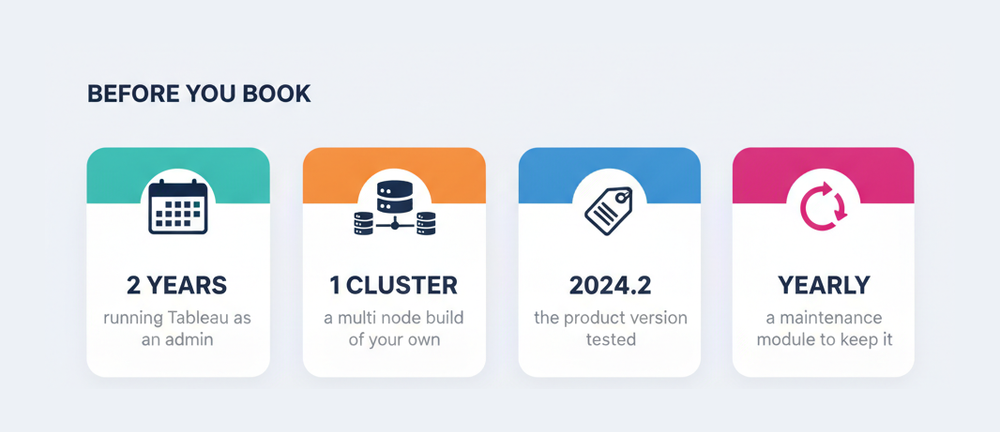
The distributed environment requirement is the one to check honestly. A single node installation never forces decisions about node roles, a coordination ensemble, an external repository or a load balancer, and those decisions are scattered across two of the three domains. If every Tableau Server you have touched ran on one machine, build a multi node lab before booking.
The credential also comes with a running commitment. Holders complete a Tableau Architect maintenance module on Trailhead once a year to keep the certification current, so passing is the start of a yearly cycle rather than a one-time event.
The site has covered this credential before under its older code, and the TCA-C01 architect companion is useful for the role framing, though its figures predate the current exam and should not be used for planning.
How should you prepare for the Tableau architect exam?
Prepare for Analytics-Arch-201 in a lab rather than a reader. Build a multi node Tableau Server, wire up more than one authentication method, run a migration and a load test, then study in proportion to the weightings, with roughly four fifths of your time on deployment, monitoring and maintenance.
- Map your experience against the sixteen objective groups and mark every named task you have never performed yourself.
- Build a multi node Tableau Server lab with an external repository, an external file store and a coordination ensemble.
- Configure at least three of the eight authentication methods, then break each one on purpose and fix it from the logs.
- Plan one migration in each direction between Tableau Server and Tableau Cloud, and note which tool fits each direction.
- Run a load test against the lab, interpret the results, and change the topology in response.
- Automate a backup, a cleanup and a scheduled content task through TSM, tabcmd and the REST API.
- Finish with timed practice of 59 questions in 105 minutes to check your pacing before the real sitting.
Two groups of candidates need to adjust the plan. Administrators who have only run Tableau Cloud should spend extra time on Windows and Linux installation, encryption and topology, since none of that exists on a hosted site. People whose Tableau work is analytics advice rather than platform work should reconsider the target altogether, because the Tableau Consultant guide describes an exam built around recommendations on content, which may fit that background far better.
Frequently Asked Questions
How many questions are on the Analytics-Arch-201 exam?
The exam has 59 questions. Salesforce states that 54 are scored multiple choice questions and up to five are unscored, and the unscored ones do not affect your result.
What is the passing score for the Tableau architect exam?
The passing score is 63 percent, and you have 105 minutes to complete the exam.
How much does the Salesforce Certified Tableau Architect exam cost?
Registration costs 400 US dollars and a retake costs 200 US dollars, both plus applicable taxes. The exam is registered through Pearson VUE.
Which domain carries the most weight?
Monitor and Maintain a Tableau Deployment at 41 percent. Deploy Tableau Server is 37 percent and Design a Tableau Infrastructure is 22 percent.
Are there prerequisites for Analytics-Arch-201?
There are no formal prerequisites. Salesforce recommends at least two years of Tableau administration and experience architecting Tableau Server in at least one distributed environment.
Which Tableau version does the exam test?
The official exam guide states that the exam currently tests product version 2024.2.
Does the exam cover Tableau Cloud or only Tableau Server?
Both. Tableau Cloud appears in its own design objective, in the migration plans, in authentication dependencies and in Admin Insights, although most objectives concern Tableau Server.
How do you keep the certification current?
Holders complete the Tableau Architect maintenance module on Trailhead once a year.
Can you use notes or documentation during the exam?
No. Salesforce states that no hard copy or online materials may be referenced while you sit the exam.
Conclusion
The Tableau architect exam is a platform exam. Fifty nine questions in 105 minutes at 63 percent, 400 US dollars to register, and three domains weighted 22, 37 and 41 percent, with deployment and operations taking 78 percent between them.
Its most useful feature is how specific it is. Eight named authentication methods, seven named migration plans, a named list of external services, and a load testing and observability routine give you a checklist you can test yourself against before spending the fee. Anything on that list you have only read about is the place to start.
Build the multi node lab, break the sign-in methods on purpose, move content in both directions between Server and Cloud, and measure the deployment before you tune it. That work prepares you for the questions and for the job the credential describes.