Search for this exam and you will find QSSA2019, QSSA2022, QSSA2024 and lately QSSA2026 scattered across forums, badge pages and study sites, each one looking like a different credential. There is only one. The Qlik Sense System Administrator certification, exam code QSSA, is the credential Qlik awards to administrators of Qlik Sense Enterprise on Windows, and the year suffixes are nothing more than the labels of successive exam versions. The current exam carries no year at all.
That naming confusion hides two facts that matter more. First, the exam covers only the client-managed edition of Qlik Sense: nothing about Qlik Cloud is tested, and a candidate who administers a tenant rather than a Windows site is studying for the wrong paper. Second, Qlik now gives you 90 minutes for 50 questions, not the 120 minutes most study pages still quote. This article sets out the Qlik Sense administrator certification as it stands today: the specifications, the four weighted domains, the node architecture the Installation domain assumes, the licensing model behind the Security domain, and a preparation order built around the experience Qlik says you should already have.
Table of Contents
- Which Qlik Sense Administrator Certification Is Current?
- What Does the QSSA Exam Look Like in Numbers?
- How Are the Four QSSA Domains Weighted?
- Single Node or Multi-Node: What Does Installation Expect You to Decide?
- How Do Streams, Tasks, Rules and AD Sync Fit Together in Configuration?
- What Does Security and Licensing Actually Test?
- How Do You Monitor and Troubleshoot a Qlik Sense Site?
- What Experience Does Qlik Expect, and How Do You Build the Rest?
- Frequently Asked Questions
- Conclusion
Which Qlik Sense Administrator Certification Is Current?
The current credential is the Qlik Sense System Administrator certification, exam code QSSA, issued by Qlik with no year suffix. It measures your ability to identify environment requirements, install and set up Qlik Sense Enterprise on Windows, manage the site, and monitor and troubleshoot it. The exam is based only on the client-managed edition and does not cover administering Qlik Cloud.
The year-stamped names come from Qlik’s habit of releasing a refreshed exam and badge every few years. QSSA2019, QSSA2022 and QSSA2024 were earlier versions of the same certification, and the Credly badge page for the 2024 release still exists alongside the unstamped one. Qlik says exams are usually updated every 3 years, sooner if a major product change demands it. When you book today, you book the unstamped QSSA.
Client-managed only, and that shapes everything
Qlik now sells two very different administration jobs. One is Qlik Cloud, where Qlik runs the platform and you manage a tenant. The other is Qlik Sense Enterprise on Windows, where your organisation installs the services, runs the repository database, holds the file share and keeps the Windows servers healthy. QSSA tests the second job and only the second job.
If your daily work is tenant administration, spaces and Qlik Cloud entitlements, none of that appears here. Conversely, the Qlik Sense Business Analyst and Data Architect exams are platform neutral, so they can be sat by cloud and client-managed users alike. QSSA is the one Qlik Sense product certification that is tied to a single deployment model.
How long it stays valid
Every Qlik certification is valid for 2 years from the date you pass. Credly emails you six months before the expiry date, and Qlik encourages recertification when an updated version of the exam is published. The Qlik certification policy page also sets the attempt limits covered in the next section.
“Earners of this Qlik Product Certification have demonstrated expertise with Qlik Sense Enterprise on Windows in the role of System Administrator. They can identify requirements for environments, install and administer Qlik Sense Enterprise, and tune and scale environments.”
What Does the QSSA Exam Look Like in Numbers?
The QSSA exam has 50 questions, a passing score of 62 percent, and a fee of 250 USD. Qlik’s exam details page gives the duration as 90 minutes. Qlik states that exam content is updated periodically, that the number and difficulty of questions may change, and that the passing score is adjusted to keep the standard consistent across versions.
| Item | Value | Note |
|---|---|---|
| Exam name | Qlik Sense System Administrator | Client-managed edition only |
| Exam code | QSSA | No year suffix on the current version |
| Questions | 50 | Qlik says the count may change between versions |
| Duration | 90 minutes | Qlik’s current exam page; older study pages quote 120 |
| Passing score | 62 percent | Adjusted by Qlik to keep a consistent standard |
| Fee | 250 USD | Full payment required for every attempt |
| Attempts | 3 per exam version | 48 hours after a first fail, 14 days after a second |
| Validity | 2 years | Credly reminder six months before expiry |
The 90 minute duration, and where 120 came from
The official QSSA exam page displays 90 minutes as the duration. Many third-party pages, and the search snippets built from them, still show 120 minutes, which was the figure on earlier versions. Plan for 90. At that pace you have 1 minute and 48 seconds per question, which is comfortable for a recall item and tight for a scenario that asks you to diagnose a site from a description of its symptoms.
Three attempts, then a wait for a new version
Qlik permits 3 attempts per exam. Fail the first and you must wait 48 hours. Fail the second and you must wait 14 calendar days from the previous test date before the third and final attempt. After a third failure you are blocked from registering for that exam until a new version is released, which on Qlik’s usual cadence could be a long time. Each attempt costs the full fee or a fresh voucher. The sensible reading is that the first attempt should already be a serious one, and the QSSA exam syllabus page sets out the objective list you should be able to tick through before you book.
How Are the Four QSSA Domains Weighted?
QSSA has four domains: Installation at 30 percent, Configuration at 32 percent, Security and Licensing at 16 percent, and Monitor, Troubleshoot, and Maintenance at 22 percent. Installation and Configuration together make up 62 percent of the exam, exactly the passing score, so a candidate who is strong only on those two domains is still at the mercy of the other two.
| Domain | Weight | Objectives |
|---|---|---|
| Installation | 30% | Apply concepts to plan the infrastructure for the Qlik Sense Deployment. Determine how to install Qlik Sense Enterprise on Windows using Shared Persistence. Determine the appropriate methods to deploy single and multi-node configurations. |
| Configuration | 32% | Create and manage streams and applications based on the organization’s needs. Create and manage automated tasks based on different triggers. Create and manage load balancing rules. Create and manage AD connections and synchronize users and groups. Configure nodes to meet business needs. |
| Security and Licensing | 16% | Describe the Qlik Sense licensing model. Determine how to configure user license access. Apply Qlik Sense Enterprise security rules. |
| Monitor, Troubleshoot, and Maintenance | 22% | Identify how to monitor app issues. Determine the appropriate methods to monitor and troubleshoot typical system issues. Determine the appropriate methods to perform server maintenance. |
Read the verbs. Installation and Configuration objectives say “determine” and “create and manage”, which is the language of choosing between options in a scenario. The Security objectives say “describe” and “apply”, so expect at least some direct questions about what a licence type or a security rule does. The Monitor domain is almost entirely “determine the appropriate method”, which means symptoms first and tool second.
On 50 questions those weights translate to roughly 15 Installation items, 16 Configuration items, 8 Security and Licensing items and 11 Monitor items. Qlik does not publish a per-domain pass requirement, so a weak domain can be carried by a strong one, but the arithmetic above shows how little room there is.
Single Node or Multi-Node: What Does Installation Expect You to Decide?
The Installation domain of QSSA expects you to choose between a single-node and a multi-node Qlik Sense Enterprise on Windows deployment, install it with shared persistence, and justify the choice from apps and users. A single-node site holds the services, the repository database and the file share on one server. A multi-node site spreads services across a central node and rim nodes that share one repository database.
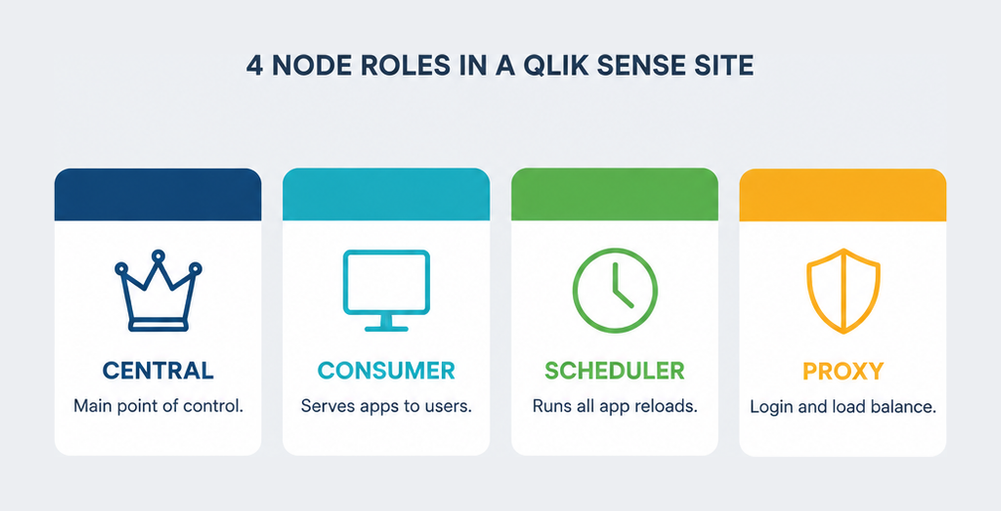
Qlik’s own onboarding guidance for administrators puts the decision in plain terms, and it is the clearest statement of what the exam’s planning objective is about.
“You define a central node as the main point of control. The other nodes, called rim nodes, can be configured to perform different roles. Examples: a consumer node that delivers apps to users, a scheduler node that handles all app reloads, or a proxy node that manages authentication, session handling, and load balancing.”
Shared persistence is the only model on the paper
The objective names shared persistence explicitly: one central file share for app data and one repository database that every node connects to. The money-site sample questions test the same point from the other direction, offering synchronized persistence and hybrid models as distractors for a new multi-node build. If a question describes nodes each keeping their own local copy of apps, that is the wrong answer for a current deployment.
Sizing by apps and users
The Qlik administrator onboarding page publishes the guidance Qlik uses to steer the single-node or multi-node choice. It is worth memorising the shape of it, because a planning scenario will describe an organisation in exactly these terms.
| Deployment type | Apps | Total users | Concurrent users in an hour |
|---|---|---|---|
| Single-node, small | 50 | 500 | 50 |
| Multi-node, medium | 100 | 1,000 | 100 |
| Multi-node, large | 1,000 | 50,000 | 500 |
| Multi-node, extra-large | 1,000 | 50,000 | 1,000 |
Qlik also notes that a single-node site suits a smaller organisation in one time zone, where reloads can run overnight while few people are logged in. The moment a scenario mentions users across time zones, heavy daytime reloads, or a wish to keep reload work away from interactive sessions, it is steering you toward rim nodes with distinct roles.
How Do Streams, Tasks, Rules and AD Sync Fit Together in Configuration?
Configuration is the largest QSSA domain at 32 percent and covers five objectives: streams and applications, automated tasks and their triggers, load balancing rules, Active Directory connections with user and group synchronisation, and node configuration. All five are performed in the Qlik Management Console, and the exam tests whether you can pick the right QMC object for a stated business need.
Streams and publishing
A stream is the container a published app lives in, and access to it is governed by security rules rather than by the act of publishing. A common scenario describes a finished set of apps that a wider audience should view but not modify. Creating the stream and publishing to it is not enough; the audience also needs a rule granting read access to the stream, which is why this objective leans so heavily on the Security domain.
Tasks and triggers
Reload tasks run on three kinds of trigger. A scheduled trigger fires on a timetable, such as every night. A task-event trigger fires when another task reaches a state, which is how reload chains are built. An external program task runs a script or executable outside Qlik Sense. Expect to match a described need, such as “refresh automatically every night with no one starting it”, to the trigger type that delivers it.
Load balancing rules
Load balancing rules decide which engine nodes may serve which apps. A rule that matches one heavy finance app to a single dedicated node keeps its calculations away from everyone else’s sessions. The exam distinguishes this from security rules, which control who may open an app, and from user directory connectors, which control who exists in the site at all.
Active Directory connections
User directory connectors import users and groups from Active Directory so that security rules can refer to group membership instead of individual accounts. Qlik’s recommended experience includes knowledge of networking and Active Directory configuration, and the exam assumes you know the difference between synchronising a directory and authenticating a user. Synchronisation populates the repository; authentication happens through the proxy at login.
Behind the connector sits the directory protocol itself. Active Directory answers directory queries over LDAP, and the behaviour that a connector relies on, from binding with a service account to filtering by group, is defined in the LDAP protocol specification. You will not be asked to quote the RFC, but a scenario about a connector that imports nothing is often a scenario about a bind account, a base DN or a filter.
What Does Security and Licensing Actually Test?
The Security and Licensing domain is 16 percent of QSSA and has three objectives: describe the Qlik Sense licensing model, configure user licence access, and apply Qlik Sense Enterprise security rules. It is the smallest domain, but its concepts appear inside Configuration scenarios too, so a weak grasp of access types and rules costs points in two places.
Access types and who gets which
Qlik Sense Enterprise on Windows allocates user access in several forms. Professional access gives a named user full authoring, publishing and ownership rights. Analyzer access gives a named user consumption rights. Analyzer Capacity is a shared, time-metered pool for occasional viewers who are not named in advance. Login access is consumed in passes. The exam likes the audience that is large, loosely defined and infrequent, because the right answer is the capacity pool rather than naming everyone.
Security rules
Security rules in the QMC are conditions written against resources, users and their properties. The same rule language governs who can see a stream, who can publish, who can edit a sheet and who can reach a QMC section. A rule is evaluated whenever a user touches a resource, so an app that users cannot open after a successful publish is almost always a rule problem rather than a licensing one.
Administrators who hold this certification are usually the people who own both the licence allocation and the rule set for a site, which is why the role tends to sit between the BI team and the infrastructure team. The Qlik Sense administrator career path rarely starts in analytics; it more often starts in Windows server administration and grows into platform ownership.
How Do You Monitor and Troubleshoot a Qlik Sense Site?
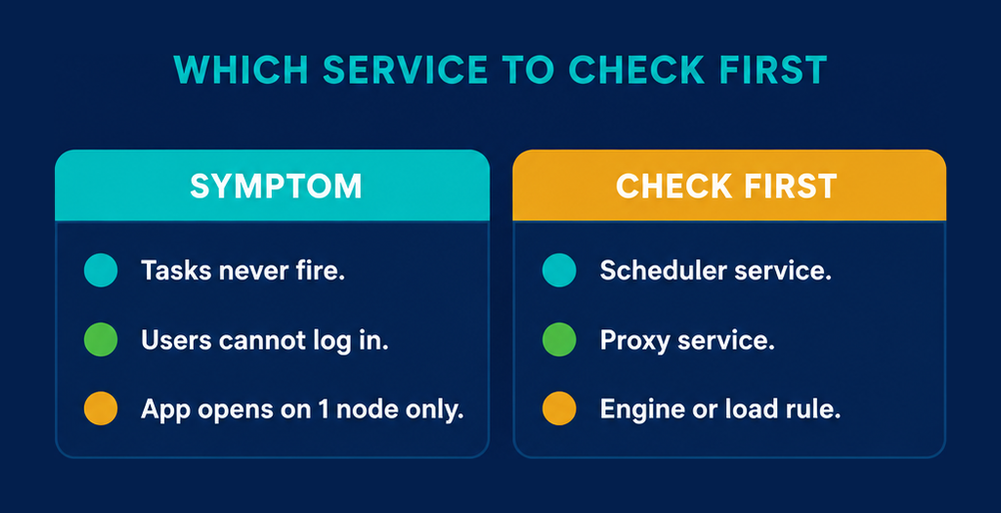
The Monitor, Troubleshoot, and Maintenance domain is 22 percent of QSSA and asks you to identify how to monitor app issues, choose the right method to monitor and troubleshoot typical system issues, and choose the right method to perform server maintenance. Questions start from a symptom, such as tasks that never fire or an object that errors on open, and ask which service, log or tool explains it.
Services first
Qlik Sense Enterprise on Windows runs as a set of Windows services: repository, proxy, scheduler, engine and printing among them. Each failure pattern points at one of them. Scheduled reloads that are enabled and valid yet never run point at the scheduler service. Users who cannot authenticate point at the proxy. An app that will not open on one node but opens on another points at the engine on the first node or at the load balancing rule that sent the session there.
Windows tools Qlik expects you to know
Qlik’s recommended experience list names the Windows tools and logs it expects an administrator to be fluent in: Event Viewer, the Services Console, the DCOM Console and the Windows Registry, plus NSLookUp, Telnet, Ping, NetStat, Fiddler and browser developer tools for connectivity and interoperability problems. Confirming that a service is genuinely running, rather than merely set to start, is a Services Console job, not a QMC job.
Maintenance that keeps a site healthy
- Archive or purge centrally collected log data on a schedule, so the logging share does not grow without limit.
- Back up the repository database and the file share together, because shared persistence makes them one unit.
- Review the licence monitor and operations monitor apps that ship with the product, since app-level issues surface there before users report them.
- Plan service restarts and upgrades on the central node with the rim nodes in mind, because the central node is the point of control for the whole site.
What Experience Does Qlik Expect, and How Do You Build the Rest?
Qlik recommends a minimum of 6 months as an administrator of a Microsoft Windows Server environment before sitting QSSA, plus hands-on experience with Qlik Sense sites and the Qlik Management Console. The exam has no formal prerequisite and no required course, but the objectives assume you have installed the product, built rules and streams, and read its logs when something broke.
The experience list, in full
- At least 6 months administering a Microsoft Windows Server based environment.
- Working with Qlik Sense sites and the QMC for data and application governance, library maintenance, and user and application security.
- Managing the policies and options that run the Qlik Sense servers and apps.
- Creating rules and managing the visualisation streams.
- Knowledge of networking and Active Directory configuration, proxies, intermediate web servers and load balancers.
- Familiarity with Windows tools and logs, and with NSLookUp, Telnet, Ping, NetStat and Fiddler for troubleshooting.
A preparation order that follows the weights
- Build a single-node Qlik Sense Enterprise on Windows site in a lab, then add a rim node and move the scheduler role to it, so shared persistence and node roles are things you have done rather than read.
- Create a stream, publish an app into it, and watch an audience fail to open it until you write the read rule, so the link between publishing and security rules is fixed in memory.
- Chain two reload tasks with a task-event trigger and schedule the first, then stop the scheduler service and observe exactly what the QMC shows while nothing runs.
- Connect a user directory connector to a test Active Directory, synchronise it, and write one security rule against a group rather than a user.
- Allocate each access type to a different test user and record what each one can and cannot do, because the licensing objective is easiest to score when you have seen the behaviour.
- Work through the money-site sample questions and the QSSA practice exam under the 90 minute limit, and treat every miss as a lab exercise rather than a fact to memorise.
Qlik’s own preparation route is the Deploy and Administer Qlik Sense instructor-led course, or the self-paced System Administrator and Deploy and Administer Qlik Sense courses. None is mandatory. If your real interest is data modelling rather than servers, the Qlik Sense Data Architect exam is the platform-neutral alternative and does not require a Windows site at all.
Frequently Asked Questions
How many questions are on the Qlik Sense System Administrator exam?
The QSSA exam has 50 questions. Qlik states that the number and difficulty of questions may change when exam content is updated, and that the passing score is adjusted to keep the standard consistent, so always check the official exam page shortly before you book.
How long is the QSSA exam?
Qlik’s current exam details page gives the duration as 90 minutes. Many older study pages and search snippets still show 120 minutes, which applied to earlier versions of the exam. Plan your pacing around 90 minutes for 50 questions.
What is the passing score for QSSA?
The passing score is 62 percent. Qlik does not publish a per-domain minimum, so a strong Installation and Configuration performance can carry a weaker Security result, but those two domains together are worth exactly 62 percent, which leaves very little margin.
How much does the Qlik Sense administrator certification cost?
The exam fee is 250 USD per attempt. Qlik requires full payment or a new voucher for every attempt, and permits 3 attempts per exam version, so a candidate who fails twice has spent 500 USD before the final try.
Does QSSA cover Qlik Cloud administration?
No. The exam content is based only on the client-managed edition, Qlik Sense Enterprise on Windows. Qlik states explicitly that it does not cover the knowledge and skills required to administer Qlik Cloud, so tenant administrators should not expect their daily work to map onto the objectives.
What is the difference between QSSA2024 and QSSA?
They are versions of the same certification. QSSA2019, QSSA2022 and QSSA2024 were earlier releases of the Qlik Sense System Administrator exam, each with its own Credly badge. The exam you register for today carries no year suffix and is the current version.
How long is the Qlik Sense System Administrator certification valid?
All Qlik certifications are valid for 2 years from the date you pass. Credly sends a reminder six months before expiry, and Qlik encourages holders to recertify when an updated version of the exam is published, which usually happens about every 3 years.
Can I retake the QSSA exam if I fail?
Yes, up to 3 attempts per exam. You must wait 48 hours after a first failure and 14 calendar days after a second. After a third failure you are blocked from registering for that exam until a new version is released.
Is there a prerequisite certification for QSSA?
No certification is required. Qlik recommends at least 6 months administering a Windows Server environment, experience with Qlik Sense sites and the QMC, and knowledge of networking and Active Directory. Training courses are offered but are optional.
Conclusion
The Qlik Sense administrator certification rewards one kind of candidate: the person who has actually run a Qlik Sense Enterprise on Windows site, planned its nodes, written its rules and read its logs. The specifications are modest, 50 questions in 90 minutes with 62 percent to pass, but the three-attempt limit and the 250 USD fee make a casual first sitting an expensive way to learn where your gaps are. Treat the four domain weights as a study budget, spend the most time where Installation and Configuration overlap with Security, and make sure the Windows tools on Qlik’s experience list are second nature. When you can explain why a published app is still invisible to its audience and why a valid task never fired, work through the syllabus objectives one by one and book the exam with a lab behind you.